A month into using Apple Vision Pro as my primary work display, I am still a fan. The space is the product. I can put a browser, an editor, notes, a ballgame, and my Mac wherever I want them.
That is also the problem.
Vision Pro gives me unlimited room for windows and no way to see all of them at once. On a Mac, I would swipe up with three fingers and get Mission Control. On Vision Pro, I turn my head and hope.
So I designed the feature I want. Apple, please steal it.
The window pile-up
Here is what a normal afternoon looks like. Mac Virtual Display in the middle. Safari off to the left. Notes drifting in front of the Mac because I dragged it there for one second an hour ago. Mail somewhere behind everything. Music, because of course. And a game I started in the living room that is still technically open, in the living room.
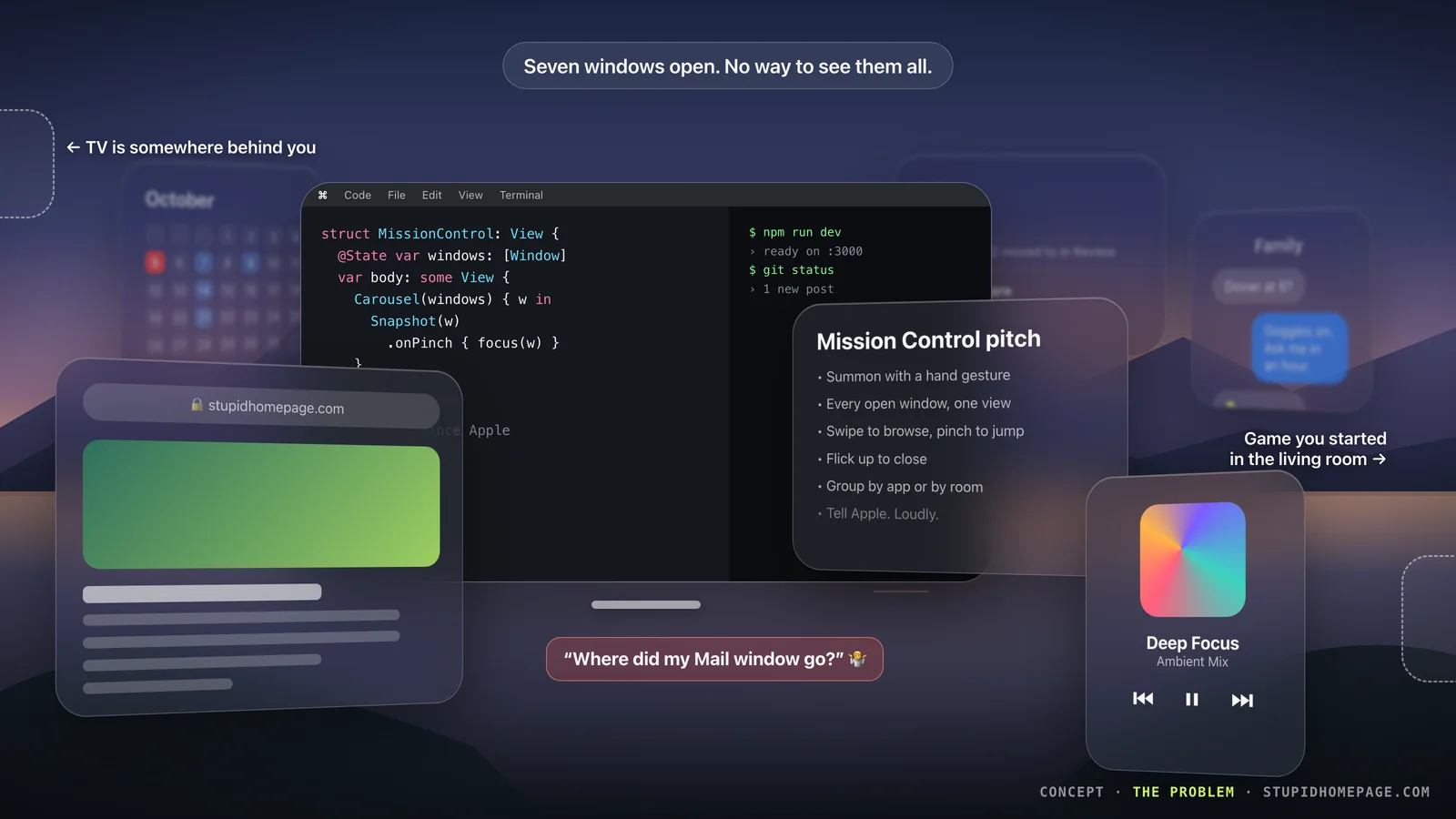
And it gets worse with the ultrawide Mac Virtual Display, which is the whole reason I use Vision Pro for work. Once the Mac is stretched into that giant curved panorama, it takes up most of my field of view. Every other window either sits in front of it, covering the code I am trying to read, or gets pushed behind it, where I cannot see it at all. In practice, the Mac covers almost everything. My Safari window is still open. It is just somewhere behind 30 feet of Xcode.
So I stop using visionOS windows and go back to doing everything on the Mac, which is a strange outcome for a computer built around windows floating in space.
visionOS has a couple of tools for this, and neither solves it:
- Holding the Digital Crown recenters everything. That is useful when windows drift away, but it moves my windows. I spent time putting them where they are. I do not want them dragged to my face. I want to find one.
- The Home View shows apps, not windows. Tapping an app brings back that app, but it does not show me what I already have open or let me pick the right Safari window out of three.
On a flat screen, windows can only hide behind each other. In a room, they can hide behind each other, behind you, and in a different room entirely. The more space you have, the more you need an overview. Vision Pro has the most space of any computer Apple sells and the least overview.
Why I am not just building it
My first instinct was to build this myself. I write software. How hard can a window switcher be?
On visionOS, impossible from the outside. Apps are sandboxed, so a third-party app cannot see, capture, or focus another app's windows. Custom hand gestures only work while your own app is running in a Full Space, and opening a Full Space hides everyone else's windows, which defeats the entire point. The system gestures belong to Apple.
I could build a "workspace" app with a switcher for its own windows, but that is a browser with extra steps. As far as I can tell, the real version has to live in the OS. So this is a pitch, not a product.
I would love to be wrong about that. I do not care who builds this: Apple, an indie developer, or me. I just want it. We have had Mission Control on the Mac for almost 20 years, and Vision Pro needs it more than the Mac ever did.
The pitch: Spatial Mission Control
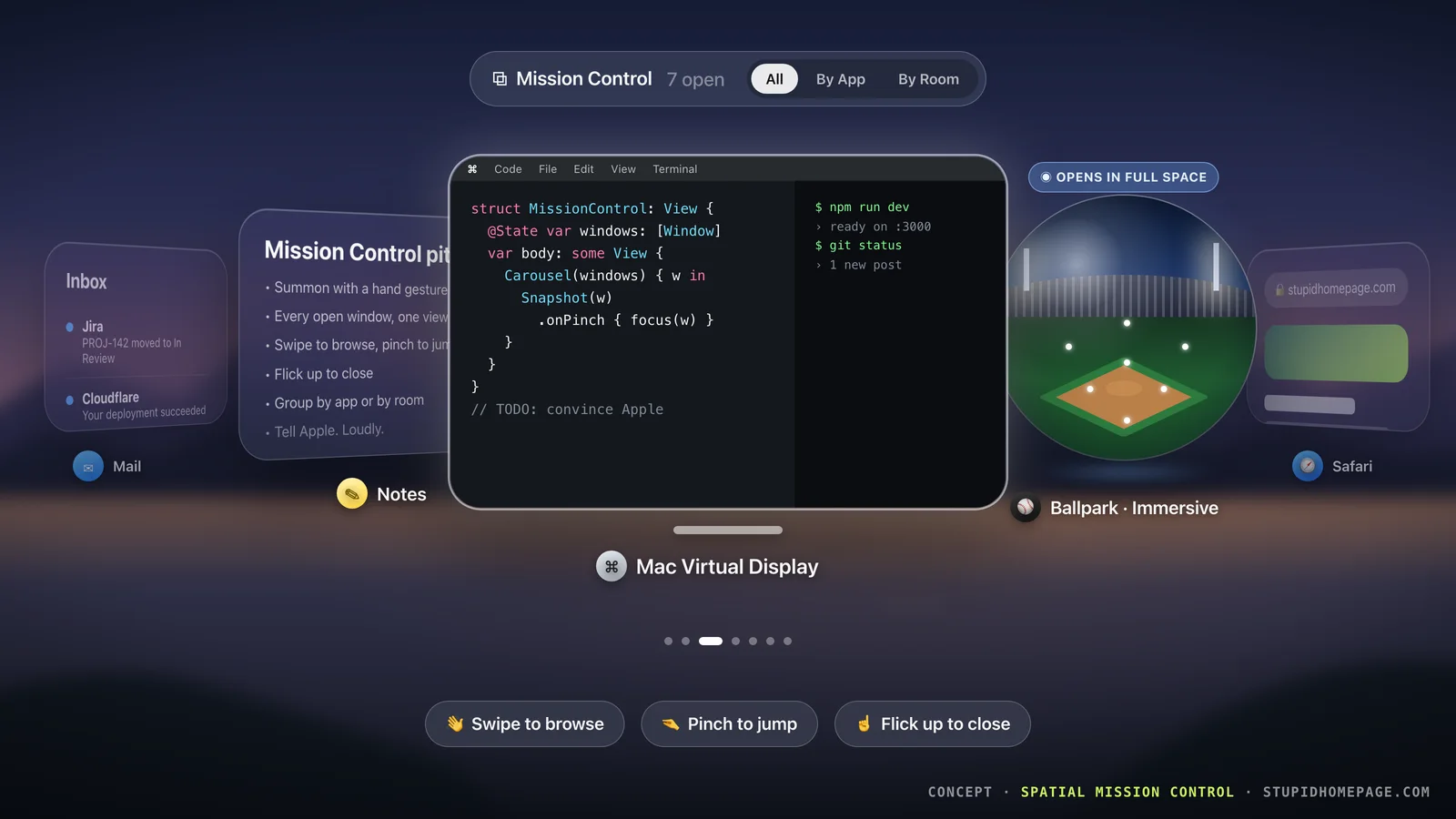
One gesture, from anywhere, over any app. Every open window fans out in front of you as a curved carousel, without moving anything in your room. Swipe to browse. Pinch to jump. Let go and everything stays exactly where it was. That is the image at the top of this post.
The details that matter:
- Live snapshots, not icons. I need to tell my three Safari windows apart. Show me what is in them.
- Your eyes pick, your fingers confirm. Look at a card to bring it forward in the carousel. Pinch to jump to it. That is how visionOS already works, so it requires nothing new to learn.
- Pinch takes you there. Picking a window either brings it forward or turns you toward it, depending on where it lives. Either way it stays where I put it.
- Flick up to close. Same muscle memory as the iPhone app switcher.
- All, By App, By Room. "All" is the carousel. "By App" stacks windows like Exposé on the Mac. "By Room" is the one only Vision Pro could have: windows grouped by where you left them, so the living room game shows up under Living Room instead of pretending it is next to your desk.
The gesture
Apple already taught everyone a hand gesture for system stuff: look at your palm and the Home button appears. I would not invent a new one. I would extend that one.
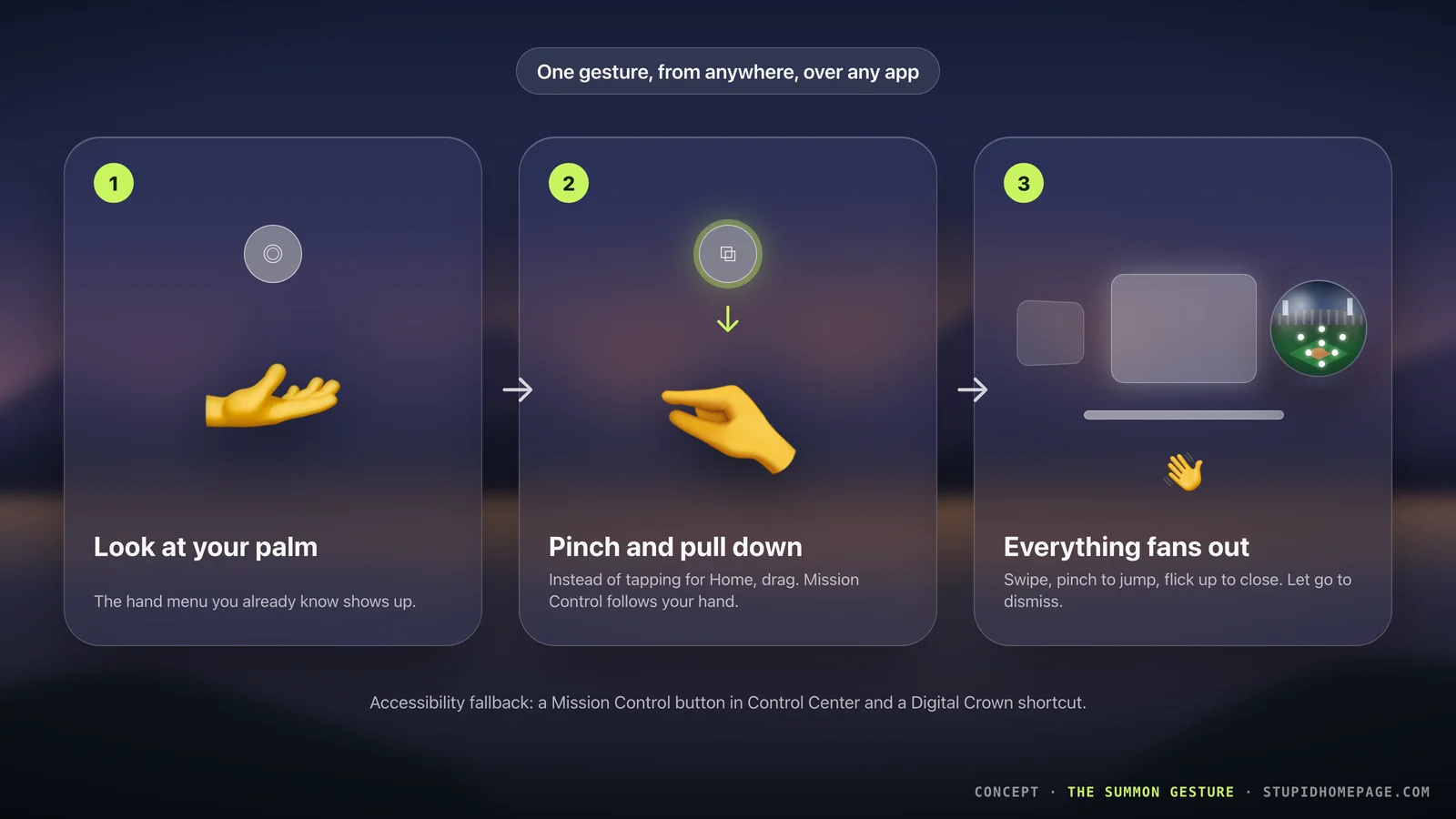
- Look at your palm. The hand menu appears, like today.
- Pinch and pull down instead of tapping. Mission Control follows your hand as it opens, so it feels like you are pulling the windows toward you.
- Everything fans out. Browse, pick, done. Let go without picking to dismiss.
A tap still goes Home, so nothing changes for people who never learn the drag. And it needs a non-gesture way in for accessibility: a button in Control Center and a Digital Crown shortcut.
Immersive apps should be orbs
Not everything on Vision Pro is a window, so not everything in Mission Control should look like one.
If I am watching a ballgame in the MLB app in an immersive view, picking it does not just bring a window forward. It takes over the room. That is a very different action, and I want to know before I pinch.
So immersive apps show up as orbs: a glass sphere holding a live miniature of the scene, still running. The glow tells you that picking it puts you inside. Your windows step aside, the game fills the room, and summoning Mission Control again brings you back out.
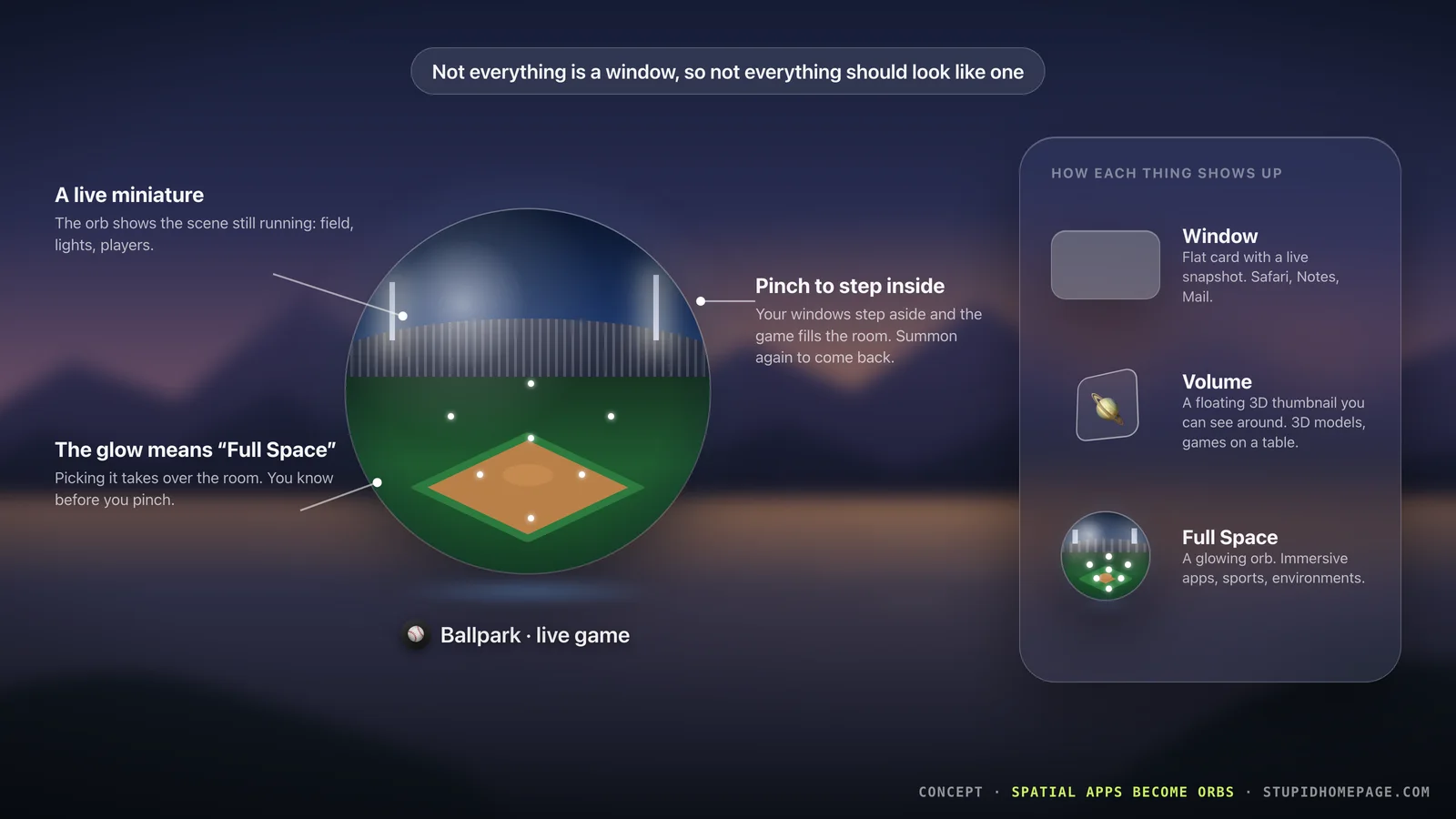
That gives each kind of visionOS content its own shape:
| visionOS content | Shows up as | What picking it does |
|---|---|---|
| Window (Safari, Notes, Mail) | Flat card with a live snapshot | Brings that window forward |
| Volume (3D models, tabletop games) | Floating 3D thumbnail | Brings the volume forward |
| Full Space (sports, immersive apps) | Glowing orb with a live miniature | Puts you inside the experience |
You can read the shape before you read the label. That is the whole point of a spatial interface.
What it should not do
A few rules, because the fastest way to ruin a feature like this is to make it clever:
- Never rearrange my room. Mission Control is a view, not a layout tool. Close it and everything is exactly where it was.
- No new hardware or controllers. Eyes and hands, same as everything else.
- Fast or nothing. On a Mac, Mission Control is instant. If this takes a second to open, I will go back to turning my head.
Help me get this built
I have no illusions about one blog post changing the visionOS roadmap. But Apple does read feedback, and a feature request with a clear picture attached is better than "pls add window switcher."
If you use Vision Pro and you have lost a window behind yourself (or behind your Mac), here is how you can help:
- Tell me if I missed something. If there is already an app, a setting, or a trick that does this, I want to know. If you are a visionOS developer and know of an API that would let a third-party app see or switch between other apps' windows, even partially, tell me that too. Find me on X or GitHub.
- Tell Apple. Send it through Apple's product feedback page or Feedback Assistant if you are a developer. Ask for a way to see and switch between every open window, and feel free to link this post.
- Share this. The more people asking for the same thing, the harder it is to ignore.
Vision Pro already made my monitor feel like furniture. It just needs a way to find everything I put in the room.
Until then, if you need me, I am the one in the goggles slowly spinning in my chair looking for Mail.